
Going available and delivery offers
How to start taking work, and how an offer works.
Go available
- Open the driving screen.
- Tap Go available.
The screen changes to "You're online. No offer right now." You are now available for deliveries in St. Stephen. Tap Go offline when you want to stop.
When an offer arrives
An offer takes over the whole screen with a countdown, and the phone alerts you.
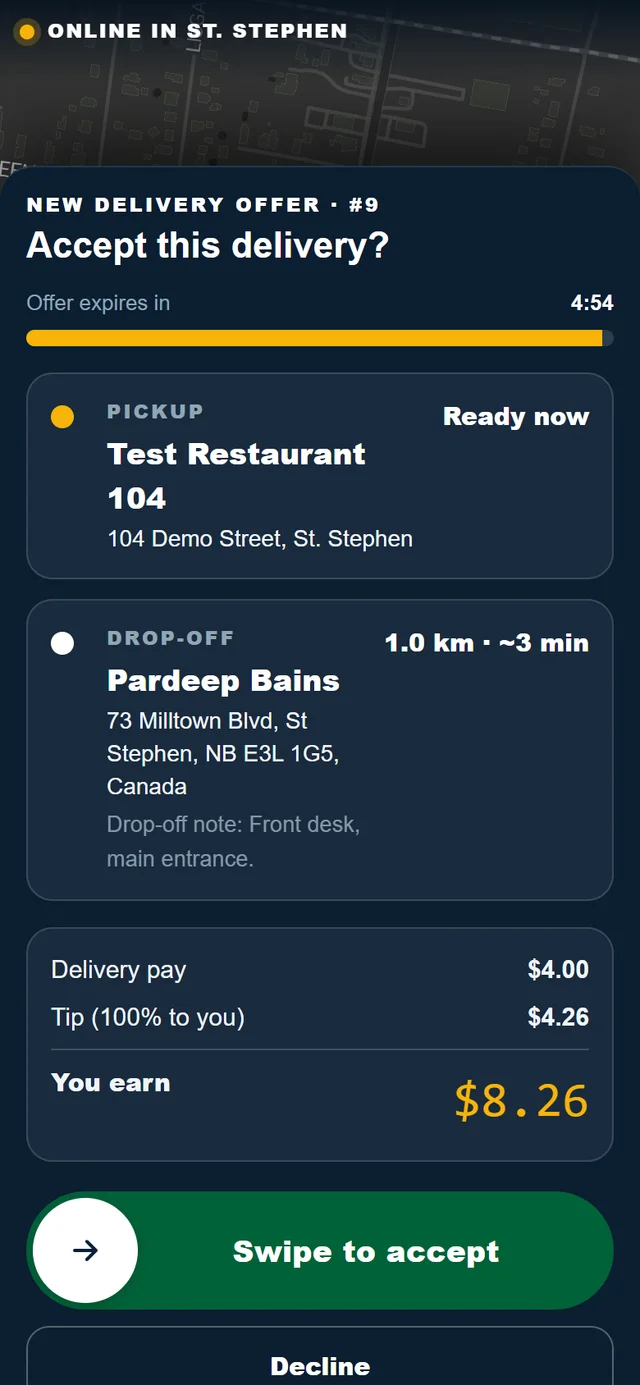
The offer shows:
- the restaurant to collect from and where the order is going,
- the distance,
- the estimated pay,
- Offer expires in, counting down. You have 5 minutes.
Accept or decline
- Swipe to accept takes the delivery.
- Decline passes it to the next available driver.
- If the countdown runs out, the offer is recorded as missed and moves to the next driver.
A swipe, not a tap, so a delivery is never accepted by accident. With a keyboard, focus the handle and press Enter.
Who gets offers
- You must be available, and your app must be open and connected.
- The delivery must be inside your service area.
- While you are on a delivery, you are not sent another offer.
If you stop getting offers
The Today page of the driver portal tells you where you stand:
| What it says | What it means |
|---|---|
| You are online. Dispatch can send you offers. | All good. There may simply be no orders. |
| You are offline. Dispatch is not sending you offers. | Tap Go available on the driving screen. |
| You are marked available, but your phone is not connected. | Open the driving screen on your phone and keep it open. |
Need help? Call or text Pardeep Bains at (506) 321-7974, or email pardeep@ssgo.ca.
St. Stephen Go is new. No real customer payment has gone through it yet, and card payments run in test mode until Pardeep says otherwise in writing.